This article provides a clear overview of the main controls, operating instructions, and essential troubleshooting steps for Thetford 12V fridges installed in Cruisin Motorhomes vehicles.
Use this guide to ensure optimal fridge performance throughout your journey.
1. Understanding Your Fridge Controls
Your Thetford 12V fridge has four main control functions:
Power Button – Turns the fridge on or off.
Fridge Temperature Control – Adjusts cooling level in the fridge compartment.
Freezer Temperature Control – Adjusts cooling level in the freezer compartment.
Night Mode – Reduces operational noise during sleep but also reduces cooling efficiency.
2. Powering the Fridge On
To switch the fridge on:
Press and hold the power button until the display activates.
3. Adjusting Temperatures
Fridge Temperature
Tap the display screen once.
Hold your finger on the screen.
Slide your finger to select the desired temperature.
Freezer Temperature
Tap the display screen once.
Hold your finger on the screen.
Slide to adjust the freezer temperature.
4. Switching the Freezer On or Off
To conserve power, especially when the freezer is not needed, you may turn it off:
Press and hold the control symbol located to the left of the temperature controls until the freezer switches off.
5. Using Night Mode
Night Mode lowers the fridge’s noise level while also decreasing cooling performance.
Activate Night Mode by pressing the night-mode button.
Avoid using Night Mode in temperatures above 30°C, as the fridge may warm up.
6. Power Requirements & Best Practices
To maintain proper fridge operation:
Plug your vehicle into a powered campsite every second night to fully recharge the house batteries.
Park on a level surface so the fridge can cool efficiently.
Do not overfill the fridge, as obstructed air circulation reduces cooling performance.
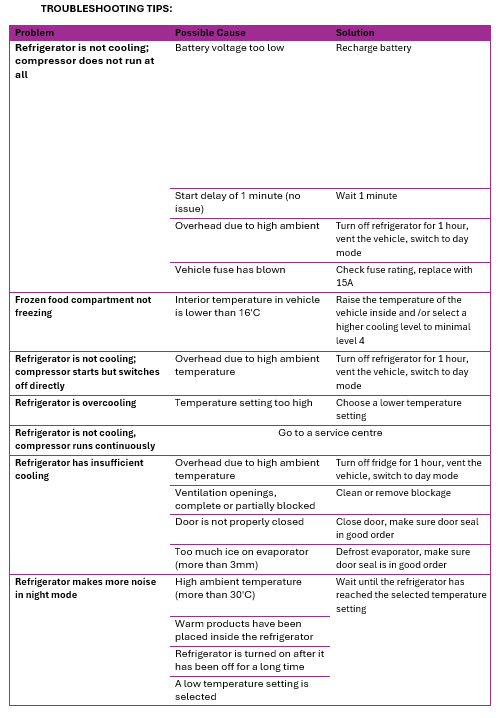
7. Need Further Assistance?
Cruisin Motorhomes provides additional troubleshooting videos and PDF guides.
If you require help, please contact our support team:
? 1300 016 532
Was this article helpful?
That’s Great!
Thank you for your feedback
Sorry! We couldn't be helpful
Thank you for your feedback
Feedback sent
We appreciate your effort and will try to fix the article